

IN YOUR GMAIL
Desk lamp deliveryFriday, 2–4 PM
Name: Alex Sample123 Example Lane+1 202-555-0142
Personal details includedA LITTLE BOUNDARY. A LOT MORE POSSIBILITY.
Put your Gmail to work with AI.
Choose what gets shared through KnoMe.
Start with Gmail. We’ll help you get connected.
A small story about a very personal choice.
Muse asks for the departure time in a flight confirmation. KnoMe checks the access card, retrieves the email in a private room, and covers the booking reference and passport number before handing it over. The name and flight time stay visible because these example permissions allow them. This is an animated explanation, not a recording of the product or a claim of affiliation with Meta.
YOUR RULES, BEFORE THE SHARE
Illustrative example. Controls apply to requests through KnoMe. AI setup varies by tool and plan.
FOR PEOPLE WHO WEAR MORE THAN ONE HAT
Let AI help with the work in front of you.
Set the sharing rules for the email it receives through KnoMe.
YOUR RULES, MADE VISIBLE
Choose an example. Set its permissions.
See exactly what changes in this demo.
 IN YOUR GMAIL Original
Project update
The website draft is ready. Please send your feedback by Thursday. The project brief is attached.
For this AI connection
ADDITIONAL SHARING
Sign-in codes, passwords and recovery secrets.
 WHAT YOUR AI RECEIVES
Feedback is due Thursday.
Hiding personal details does not remove all confidential work information. Share work context only with an AI you trust.
Fictional examples; these switches do not connect an account or change real permissions. In the product, changes apply after you save and affect future requests. Filtering depends on detected content and can miss information.
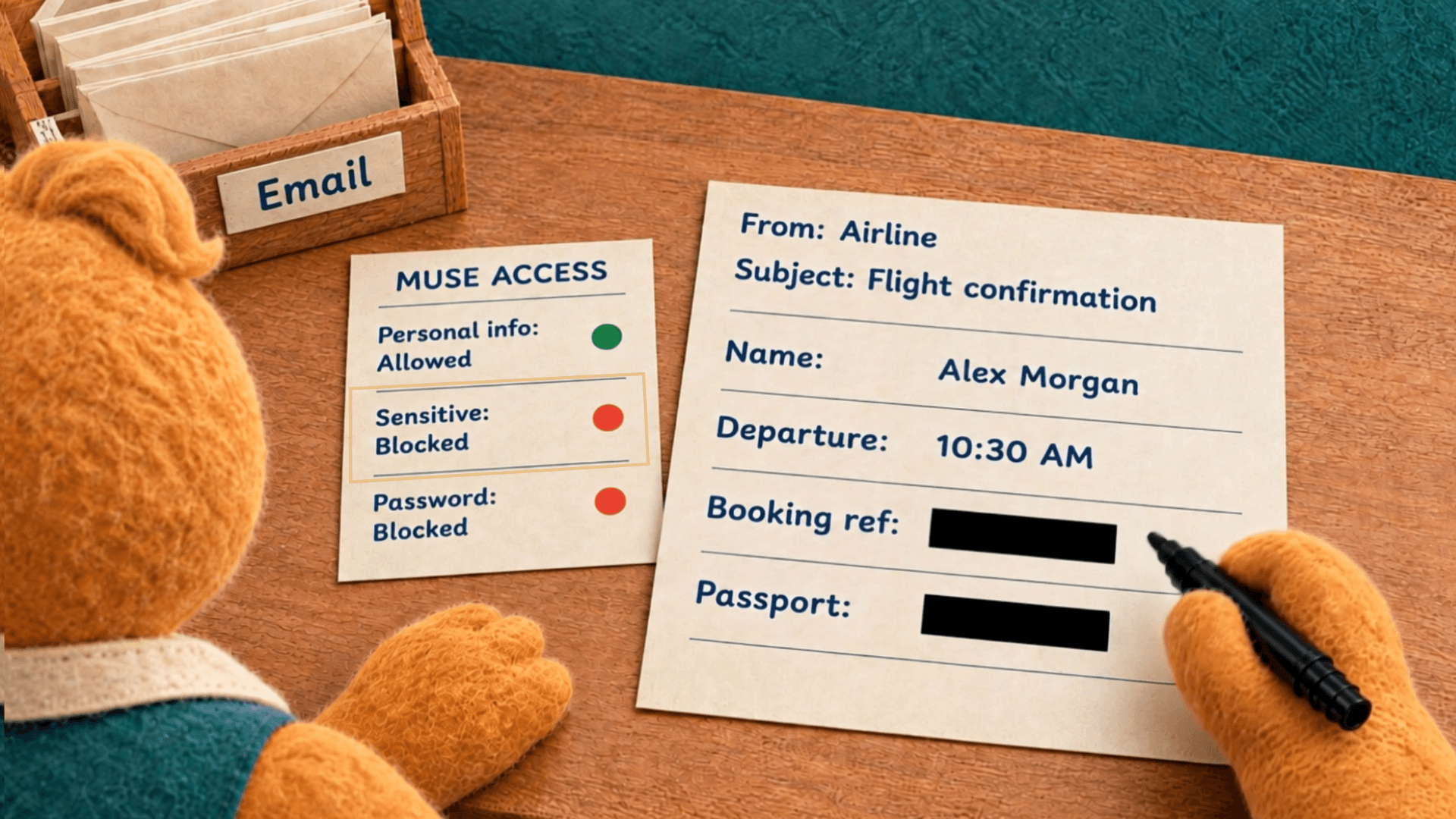 ILLUSTRATIVE FILM STILL
THOUGHTFUL BY DESIGN
KnoMe sits between your connected email and your AI. You choose its permissions. KnoMe applies those rules to the content it returns.
A SMALL SETUP. A CLEAR BOUNDARY.
Choose the account you want to use. Connecting Gmail and letting an AI read it are separate choices.
Connect your AI to KnoMe using its supported setup. Keep working in a tool you already know.



Set permissions for that AI, try a sample request, and review its activity. Change or pause future access whenever you need.
MORE USEFUL AI. MORE ROOM FOR YOU.
Running your day. Running a business.
Sometimes both at once.
Ask about a delivery or a trip. Keep personal details filtered and sign-in codes out of reach.
Get useful context from permitted email, with sharing choices for each AI you connect.
Running a small agency? Start by exploring your own email workflow. Shared team controls are a proposed next step.
Register your interestNo. Connecting your account and granting an AI access are separate steps. You choose which account an AI can read and what additional information it can receive through KnoMe.
Read emails is the starting permission. You can separately allow personal details, masked sensitive context, and checked text extracted from attachments. Raw identity numbers stay masked; sign-in codes, passwords and recovery secrets stay blocked. Original attachment files are withheld. Sign-in codes cannot be enabled for AI sharing.
These connections are read-only. They cannot send email or change your inbox through these tools. The connected inbox’s email address is visible to an allowed AI; the personal-details setting controls information inside the emails.
That’s a separate path. KnoMe’s rules only apply to requests sent through KnoMe. Remove the direct connection in your AI tool if you want its email access to follow your KnoMe permissions.
Yes. Change permissions or pause a connection to stop future access through it. This cannot recall information that has already reached an AI provider.
No. KnoMe filters the connected data that passes through it. It does not control what you paste into an AI chat, guarantee detection of every sensitive detail, or change an AI provider’s training and retention policies.
PUT YOURSELF BACK IN THE MIDDLE.
Request early access, then meet with us to set up your first Gmail connection.